Showing posts with label Sony. Show all posts

October 6, 2016

Sony PlayStation VR review


Sony PlayStation VR review


There's a lot riding on the PlayStation VR. Sony's VR ambitions. Maybe, the VR industry as a whole.
With more than 46 million PS4s in households already, it's common knowledge that it'll probably completely trash Oculus Rift and HTC Vive sales. How many people do you know who could afford more than $1000 on a PC and high end headset? How many people do you know who could afford a PS VR? Exactly.


But that also means it will be most people's introduction to 'good' VR. With compromises made on the hardware to achieve that price, PlayStation VR is not perfect. But it's going after console gamers hard and ultimately, it is still a truly awesome PS4 accessory.
We're going to try to not compare the PlayStation VR to a VR system essentially twice its price - the HTC Vive - but with nothing else in the PS VR's category of quality but affordable VR, that is the benchmark. We'll update this review after PlayStation VR launch day and revisit it in a few months because this will live and die on the games.

Sony PlayStation VR review: Initial set-up


Sony really has found a sweet spot in terms of keeping the PS VR practical and accessible. If you already have a PS4, setting up the PlayStation VR is super simple. Just set up your PlayStation Camera first - this is required to play, not an extra like the Move controllers - then follow the instructions to connect all the correct cables from the Processor Unit to your PS4.
The main thing to remember is that it becomes a pass-through for your HDMIs - one goes from the TV into the unit, another from the unit to the PS4. One small niggle: this does affect HDR performance on your TV.
Then just connect the headset itself to the Processor Unit - we'd recommend going with the longer cable here so you can turn around comfortably - and power on the PlayStation VR via the in-line controls which also include volume and mic buttons.
Sure it's not wireless like a mobile VR headset but you (probably) won't need to rearrange your furniture either. There's no room mapping needed, you just need to tinker with the Camera to line it up with your head once you've plonked your new VR gaming chair where you want it to be. Sony recommends playing PS VR seated rather than standing, sitting 5 feet from the Camera with enough room on either side for you to lunge/duck/turn and that's about right.


It helps if your PS4 is close to your TV as the standard PlayStation Camera wire is pretty short and this needs to both hook up to your console and be able to see your face. You might think this goes without saying but in my flat we have the PS4 and other consoles and boxes tucked away in a corner of the open plan lounge/kitchen with the HDMIs going through the walls from the wall mounted TV down the other end of the room. It was tricky but I still made it work.
Our only beef in fact is that if you're a little OCD about having no wires in the living room, it's tricky to make everything look neat - there's the HDMIs going to the headset, for instance, and depending on which PS4 you have USBs on the front too which means cables looped around from there too. It's not a dealbreaker for me but our editor-in-chief Paul Lamkin was a little more unhappy.
Set up is easy and you also always know where you are with the menus - once you've downloaded some VR games (which can take a while) they just appear in your regular PS4 menu for you to select. This appears in VR too using PlayStation's Cinematic Mode - it's a 2D screen floating in blank 3D space and you can press the PS button on your DualShock to quit apps and games and get back to it at anytime which is reassuring.

Sony PlayStation VR review: Design and comfort


We have a soft spot for the PlayStation VR's design which we're just gonna go ahead and call stylish. With its blue lights (which act as head tracking points), the padded crown section on your forehead and the black and white finish, this looks like a complete consumer headset from the near future. When newbies see it, they want to put it on their heads… like now.
Once it's on, it's feels very light, at 610g, and doesn't feel like it's going to slip down your face or bother your nose like other high end headsets can. That's even after an hour or so of playing. There's no pass-through camera to see what's going on in the real world but there is a super handy button on the bottom of the headset that slides the screen back and forth to get a secure fit or check up on the room you're in without taking the whole thing off.
The wire also doesn't get in the way, especially as you won't tend to be stood up moving around - we've only managed to disconnect the PSVR once by moving and that's just because it was trapped under the chair leg.


It's easy to get to grips with but that doesn't mean the design is perfect. Because there are no adjustable straps and a cushioned band instead it can be quite uncomfortable to get on and off, catching your hair (if you have it) when you pull it off without extending the band again for instance. There is a button round the back to control this, as well as a dial to tighten it up, but often you'll forget and just yank it off.
The rubber sections around your face and particularly to the sides feel flimsy and don't give you that secure feeling of being enclosed in a cushioned Vive or even a Gear VR. Essentially even though they don't let any light in, if you bash the side by accident during a game, say, it can flex and let some of the world around in which is exactly what you don't want. Maybe we'll see future accessories to address this but for now, it can be slightly distracting, not to mention a little sweaty.
Then there's the fog - Sony hasn't quite managed to solve this problem of when you first put the headset on or use it in a new temperature/room. It's not too much of a problem and it does disappear but, as a first impression, it's not ideal.

Sony PlayStation VR review: Display


As we said, the PlayStation VR sits smack bang in the middle of high end headsets and mobile VR headsets. The display is a single 5.7-inch 1920 x 1080 OLED - both Rift and Vive have two displays a-piece and what we have here is a similar size to a Note phone in a Gear VR. It's a 100 degree field of view which is slightly smaller than Rift or Vive (and some mobile VR headsets now).
Still, Sony has a couple of things going for it with an (up to) 90Hz, or even 120Hz, refresh rate (using its 'reprojection' tech when games aren't running natively at those rates) and RGB sub-pixels designed to increase the overall immersion of the picture.


The VR worlds we saw via this headset look rich, vibrant and immersive on the display and as Sony boasts, we encountered very little visible lag in the images thanks to its less than 18ms latency. If this was higher-res, it would be dazzling. When viewing objects close up, in particular, the con starts to crumble but to be fair this is something that even the high end Rift and Vive make compromises on.
And we'll probably say this more than once: if you've been spoiled by Vive, you'll notice the difference immediately. But the truth is that many people haven't used Vive yet and/or can't afford it, and PS VR will be enough to bowl them over. There's also a slight screen door effect here. You'll spot it in the intros of games, in particular, before they get going and you're looking around at abstract 3D menus. But once games get going, you'll forget all about it as you concentrate on the gameplay at hand.
So it's not the most mindblowing VR headset display but, combined with a compelling game narrative, it's more than good enough to help you feel like you're in that VR world.

Sony PlayStation VR review: Tracking and performance


This is not a VR system built for lots of physical input and that's OK. If you're happy sitting down and getting the thrill of moving your head, ducking and turning round to shoot in different directions, then you are well served here - just don't expect to be running around your living room. The 1:1 head tracking by the PlayStation Camera is superb and, in games where you can see the DualShock as an animation in VR (like Tumble VR), this is tracked very well in terms of turns and micro movements.

Note: we've been testing the PS VR with the now outdated PlayStation Camera but will update the review once we've tried the redesigned Camera accessory that's going on sale soon - although Sony itself says there's no difference at all when it comes to performance.
So here's where things trip up a little: the Camera is supposed to be able to track your head if you turn around as it's 360 degree and there are head tracking points on the back of the band. But if you're in something likeLondon Heist where the action is all around and you might want to look over a desk to shoot or turn back to see an exploding van, you can quickly find yourself 'outside the play area'. If you switch players of different heights or fancy standing up, you'll have to recalibrate the Camera which quickly becomes annoying and essentially involves two people. When you're in a game, you can hold down 'options' on a DualShock to reset to your view, though, which is quick and works like a charm.
When 'picking' up blocks to solve laser or stacking puzzles in Tumble or grabbing guns and other objects, the controller tracking and in-game movements don't match up as well as something like what Vive can offer. It's good enough to work and offer some clever, delightful tricks like 3D audio taking advantage of you holding a phone to your ear (when using headphones, of course). And again the more impressive tech is over double the price plus the cost of a gaming PC.

Sony PlayStation VR review: Controllers

A real plus point for the PlayStation VR is that you can just play with your DualShock controller that you already own (thus saving money) or your Move Motion controllers if you have those. It's worth saying that it's awesome that you can start playing with controls you're already used to from years of gaming.
If you don't already own the Moves, you can buy the new redesigned, rebranded stick controllers either as a launch bundle or at a later date. There's a lot of freedom and the PS VR Aim controller - the gun shaped one which will work with upcoming sci-fi game Farpoint - will join the options soon enough too.


We'll update this review with our thoughts on the Move controllers for now, we'll say the potential is hella exciting - they can act as guns, wands, swords, torches with 1:1 hand tracking.
They aren't as intuitively designed as Oculus Touch and don't have finger tracking but they're smaller, lighter and less unwieldy than Vive's controllers. As the PS VR Aim shows, the VR peripheral market for PlayStation VR could be huge and quickly gain momentum once the headset launches and more games go live.

Sony PlayStation VR review: Motion sickness

We can't ignore motion sickness on the PlayStation VR, when the headsets ship we predict more than a couple of stories about this. Maybe it's the display resolution or some other technical difference but we've had a few bouts of mild motion sickness with the PS VR; more so than with more expensive headsets like Vive.
Now, it really does depend on the game and how long you've been playing. Various members of the team experienced some nausea ranging from barely noticeable to on the verge of actually throwing up when playingfor over an hour. Sony says takes a 15 minute break after an hour and we strongly advise sticking to this no matter how tempting it is not to.
Some games are more likely to make you motion sick than others too - namely any game that artificially moves you and there's a lack of controls as to the speed/direction. So racing games like the VR Luge demo and things likeDriveclub VR may be a problem - just see how you feel - as well as the high speed space dogfights of EVE: Valkyrie or a rollercoaster segment in Until Dawn: Rush of Blood. In games where the action was slower and we stayed in a more static viewpoint, we experienced close to zero motion sickness.
The other thing to keep an eye out for - literally - is headaches and eye strain. Keep blinking, close your eyes during loading screens and take regular breaks.

Sony PlayStation VR review: Games


The PlayStation VR isn't even shipping yet and Sony has already won the VR games war. The big figure is that 50 titles are slated to launch by the end of 2016 and we've already been getting to grips with ten of them pre-launch.
Yes there are still high quality demos that leave you wanting more - seeLondon Heist - but there's already a hell of a lot of variety and quality in the games available at launch and coming soon. There's experimentation with story and controls but there's also games and characters and environments that you recognise. Plus it's not all $50 titles so you won't go bankrupt within days.

We've been playing 3D puzzle game Tumble VR and virtual reality stapleBattlezone (a timed launch exclusive for PlayStation) but there's also the addictive Headmaster and fun for all the family Job Simulator.
We're talking well realised, repeat play games some of which are long-ish and have really strong narratives that truly suck you into the VR with multiplayer for games like the very fun mech battle game Rigs: Mechanised League andEVE: Valkyrie (which you'll be able to play against Rift users). For now, it's probably missing that one, great first person title that offers hours and hours and gameplay - which won't be made quickly or cheaply for VR by anyone - but it's really only a matter of time (and resources).

September 22, 2016

Sony MDR-1A over-ear headphones review


Sony MDR-1A over-ear headphones review


The MDR-1A can be called Sony’s signature over-ear headphone, or the within-reason premium offering before things go into crazy expensive audiophile territory. Let’s see if the MDR-1A should be your next upgrade.

Design


I really like the MDR-1A’s design. It’s both classy and edgy. The black, stealthy styling has a sophistication to it, as the leather-dominated headband blends into shiny metallic stems. Then a deep red edge is lined between the earcup and earpad, for a touch of flair


The soft, leather-wrapped earpad cushions and seamless stitching also invoke the premium feel. The attention to detail doesn’t stop there, as you’ll uncover a brushed metal band when you extend the headband to make it larger.
I’m glad that the MDR-1A looks the part, as it’s not a cheap headphone. That said, it does lose of its premium appeal when you pick it up. The hard plastic construction is immediately noticeable (the 
metallic finish is a deception). Still, I have no question about the MDR-1A’s durability.


Sadly, these over-ears don’t have a fold-able design. Many headphone manufacturers are doing this these days so the headphone can compact down to a travel-friendly size. But at least the earcups can rotate to lay flat. This means that the carrying case doesn’t have to be as thick. Speaking of which, the included case is drawstring-style and maintains the leather aesthetic.


Usability

The packaging includes an extra cable (with an in-line remote for playback control and a microphone to take phone calls), so this means that the cable is removable. You’ll find the 3.5mm connection on the left earcup, as one arm of the stem extends downward for easy access. The benefit of a swappable cable is replaceability. Cables can go bad, and you don’t want to have to replace the entire headphone if it happens.


You may have noticed that the ear pads look fairly substantial. Sony’s goal was both comfort and sound isolation. The ear pad cushions are constructed with an “enfolding design” to minimize sound leakage.


This in no way means that the earcups are stiff and uncomfortable. Quite the opposite is true. The pads are more soft than firm. Bear in mind that as they are leather, they will heat up over a lengthy period on your head. But all in all, these earpads are one of the comfiest that I’ve used. The sound isolation was also great.


Sound

Oh boy, the sound. The MDR-1A captures you from the bat. Sony was totally not going for a “reference” kind of sound, but rather, engaging. There’s a clear emphasis on bass. But it doesn’t irresponsibility call for attention and overshadow the rest of the spectrum. It’s boisterous in the right ways: depth and impact. You can almost feel the low-end’s sound waves shake the space within the earpads. It borders on head-rattling; if you love bass, you must try these headphones.
However, from an audiophile perspective, I have to throw a word of caution. If you like a balanced/neutral sound, these may not be for you. The bass is the clear star of the show here. It does at time borderline on boomy, but impressively controlled for the most part.
I don’t mean to downplay the rest of the range, though. The MDR-1A is detailed across the board. Second to the bass is the mid-range. Vocals and instruments in this region sound satisfyingly full and rich. Too often sound signatures recess the mids and do them an injustice, not so here. The soundstage is also pleasant, as the separation and placement of notes fill the space around you.
I wasn’t as impressed with the treble as the other ranges. It’s good, but can fall flat at times (there could be more extension) or get overshadowed by another sound. I wouldn’t call it recessed, because when the track calls for it, it’s prominent and detailed.


Final Thoughts


Sony’s expertise certainly shows in the MDR-1A. The design is attractive from either a sophisticated perspective or someone who likes standout styling, the wear/comfort is impeccable, and the sound is an experience. Though, the plastic build and bass-heavy sound may put some serious listeners off, but I can see it being fine for many people.
The MDR-1A is more premium than your standard over-ears, so the price tag won’t be for the faint of heart. They retail for $299. But you are getting a well-made, good-looking, super comfortable, and fun sounding headphone.

September 21, 2016

Sony A7R II 4K Mirrorless Camera Review


Sony A7R II 4K Mirrorless Camera Review – Full Frame 42.4 MP 4k Movie Camera


THE GOOD

Where to start? Sony’s A7R II most superb features are its amazingly powerful image shooting capacity, thanks to a giant 42.40 megapixel Full-frame 35mm CMOS sensor, some remarkably great ISO performance for night shooting with very low noise levels, a lightning fast autofocus, lots of customization options, the excellent five-axis stabilization and one wonderfully compact mirrorless body.
Let’s begin with the image sensor on the A7R II. At 42.4 megapixels, this back-illuminated Exmor 4 full-frame CMOS arrangement is downright stunning in the quality of images it can capture. With the 35mm CMOS sensor, the camera is not only capable of some extraordinarily high resolution still shots and video footage, it also manages to offer these with the kind of speed and performance you often don’t even see in cameras with sensor that are half as large or less. The full-frame sensor also offer some remarkably good ISO sensitivity, which is boosted by the sheer number of megapixels and even more importantly, by the fact that this is the first Back- Illuminated full-frame CMOS on the mirrorless market. This means that the A7R II can manage an ISO that goes as high as 102,400.
This sensor is also packed together with a very impressive AF system that offers 399 embedded phase-detection AF points. This is nearly four times as many as one of Sony’s next best compact mirrorless A7-series models, the A7S II . These AF points can furthermore be exploited quite broadly for continuous AF via both E-mount and A-mount lenses if a simple adapter is included. Additionally, the built-in 5-axis sensor-shift image stabilization technology in the A7R II, which is identical to that of other Sony shooters like the A7S II, offers some fine counteraction for image and video blurring.

Then there’s the 4K video capacity in the A7R II. Unlike many other Sony mirrorless shooters, the A7R II records its 4K footage internally at an encoding rate of 100Mbps. The 4K footage capture is also available in two different formats, with the first being full-frame video and the second being cropped Super 35, both of which are encoded at the same above-mentioned bitrate and at either 30fps or 24fps. Additionally, the A7R II manages Full HD video at 60 frames per second and 720p footage at a speedy 120fps. These video resolutions can also be composed during shooting with the tilting 3 inch LCD screen or a XGA OLED viewfinder that comes with an impressive 0.78x zoom, making it into the largest EVF on the mirrorless market today.
Then there’s the body of the A7R II. It’s excellent and rugged, with a magnesium alloy design that is weather sealed and comes with one robust, durable lens mount that’s ideal for large lenses in the field. Furthermore, the camera’s shutter is designed for minimized vibration, being able to reduce said vibrations by as much as 50%.
And, as for processing of the A7R II’s massive images and video in all resolutions, the camera is equipped with Sony’s well-known BIONZ X Image processing engine, which as we’d already said, manages to handle the 42.4 megapixel still shots with the kind of speed and efficiency you’d expect from a camera with much smaller maximum photo resolution. The Image Processor and Exmor R CMOS sensor also allow for the A7R II to handle its 4K UHD video shooting needs quickly, internally and with wide dynamic range. And remember, this is full-frame XAVC-S video we’re talking about, meaning that it can be shot without pixel binning.
Going a bit further into the things we like about the A7R II’s 4K video shooting, the camera also allows for some fairly extensive customizable color and gamma controls for wide dynamic range in footage. A user can thus adjust black levels, color levels and a number of other video quality specs. The same S-Log2 Gamma Curve found in some of Sony’s top-shelf cinematic cameras is also found in the A7R II, letting it manage a hefty 1300% more dynamic range in its 4K or HD video signals. This is quite a bit more than REC-709 color space coverage allows for.


Finally, the A7R II is a solid piece of technology in all the essentials of modern mirrorless camera design, with full connectivity for wireless control and data transmission via both NFC and WiFi, letting you move non-4K video and photos directly online to social media sites or email inboxes, or perhaps to a cloud storage server. The camera can also be linked to mobile devices like smartphones through its NFC capacity. We should also note that the design of the A7R II is definitely a winner, with a firm grip, easy handling and the tough magnesium alloy body we already mentioned above. Like all Sony mirrorless models, it’s also one compact piece of technology without its lenses attached. This makes the A7R II all the more impressive given its capabilities.

THE BAD

There are also of course a couple of things we don’t particularly like about the Sony A7R II mirrorless. However, none of these come even close to being deal breakers as far as quality is concerned.
First of all, the camera is lacking in a few key features you’d think would be givens in a model with its price, especially considering that one of them is even available in far more economical Sony alpha models like the HD-only A6000. Thus, the A7R II lacks a built-in flash and this, while hardly being a major shooting obstacle, is just annoying. Furthermore, despite its massive photo resolution and 4K video recording capacity, this camera offers only a single card slot, somewhat limiting its storage capacity during on-the-fly recording. We should also note that the A7R II has no touch screen capacity, which slows things down when you want to move through settings and adjust them as needed while actually recording video or grabbing photos. Using the button controls to navigate the menu items and adjustments is definitely clumsier.
Next up, there is the simple fact that the A7R II is one very expensive piece of hardware. Yes, it delivers some spectacular specs but its price tag of well over $3000 dollars will turn off many potential buyers who will simply decide to go for something a bit more economical despite tradeoffs in specs.


Finally, start-up and shooting of photos is slightly on the slow side in the A7R II. This is nothing too serious but we’ve seen better performance in other mirrorless and DSLR models. This is also topped off by a somewhat slow buffer clearing capacity.

FINAL THOUGHTS

The A7R II from Sony was ranked by many to be the best 4K mirrorless camera of 2015 and at least for now, this ranking could easily be said to apply for 2016 as well. If not the best of its kind, it’s at least damn close. In any case, aside from some reservations about its distinctly steep price tag (especially for a Sony A7-series shooter), we love the A7R II and recommend it to both professional and prosumer photographers and videographers of all kinds.

SPECS

• Lens Mount: Sony E-mount (compatible with some Canon lenses through adapter)
• Camera Format: Full-frame mirrorless
• Max Photo resolution: 42.4 megapixels (7952 x 5304 pixels)
• Sensor Type/size: CMOS, 36 x 24 mm
• File formats:
Photo: JPEG, RAW
Audio: AAC LC, AC3, Linear PCM (Stereo)
Movies: AVCHD Ver. 2.0, MP4, XAVC S
• Supported memory cards:
SD
SDHC
SDXC
Memory Stick PRO Duo (High Speed)
Memory Stick PRO HG-Duo
• Image Stabilization: Sensor-Shift, 5-Way
• Video Resolution: 3840 x 2160: 30 fps, 24 fps, 25 fps
1920 x 1080: 60 fps, 30 fps, 24 fps, 50 fps, 25 fps
1280 x 720: 120 fps, 100 fps
• All video Formats and resolutions:
4K
XAVC S
3840 x 2160p / 29.97 fps (100 Mbps)
3840 x 2160p / 29.97 fps (60 Mbps)
3840 x 2160p / 23.98 fps (100 Mbps)
3840 x 2160p / 23.98 fps (60 Mbps)
3840 x 2160p / 25 fps (100 Mbps)
3840 x 2160p / 25 fps (60 Mbps)
High Definition
XAVC S
1920 x 1080p / 59.94 fps (50 Mbps)
1920 x 1080p / 29.97 fps (50 Mbps)
1920 x 1080p / 23.98 fps (50 Mbps)
1920 x 1080p / 50 fps (50 Mbps)
1920 x 1080p / 25 fps (50 Mbps)
1280 x 720p / 120 fps (50 Mbps)
1280 x 720p / 100 fps (50 Mbps)
High Definition
AVCHD
1920 x 1080p / 59.94 fps (28 Mbps)
1920 x 1080i / 59.94 fps (24 Mbps)
1920 x 1080i / 59.94 fps (17 Mbps)
1920 x 1080p / 23.98 fps (24 Mbps)
1920 x 1080p / 23.98 fps (17 Mbps)
1920 x 1080p / 50 fps (28 Mbps)
1920 x 1080i / 50 fps (24 Mbps)
1920 x 1080i / 50 fps (17 Mbps)
1920 x 1080p / 25 fps (24 Mbps)
1920 x 1080p / 25 fps (17 Mbps)
High Definition
MP4
1920 x 1080p / 59.94 fps (28 Mbps)
1920 x 1080p / 29.97 fps (16 Mbps)
1920 x 1080p / 25 fps (28 Mbps)
1920 x 1080p / 25 fps (16 Mbps)
1280 x 720p / 29.97 fps (6 Mbps)
1280 x 720p / 25 fps (6 Mbps)
• Max video length in 4K: about 29 minutes
• Focus Type: Auto and Manual focus
• Autofocus points: 399 phase detection and 25 contrast detection points
• Viewfinder: electronic 0.5” OLED with 0.78x zoom
• ISO: 100-25600 (Extended Mode: 50-102400)
• Shutter: Speed: 1/8000 - 30 seconds, electronic and manual
• Flash: none, attachable via hot shoe
• Connectivity: WiFi, NFC, also includes 1/8" Headphone, 1/8" Microphone, AV / USB Multi, HDMI D (Micro)
• Weight with battery and memory card: 22.05 oz


ACCESSORIES


The Sony A7R II doesn’t come with much in the way of accessories despite its high price. In fact, unlike a number of other Sony mirrorless cameras, this model doesn’t even come with an included lens when you buy the base package. Instead, what you get in the box with the camera consists of base essentials like a power cord, rechargeable NP-FW50 X 2 battery, cable protector, AC Adapter, AC-UD10, a battery charger, shoulder strap, body caps, accessory show cap, Eyepiece cup and one micro USB cable.
There is no included lens of any kind and no included flash either since the camera lacks a built-in flash mechanism. Because of this, you’ll have to separately buy both as you need them (and you’ll need a lens immediately). As for those lenses, the A7R II is of course compatible with pretty much all Sony E-mount lenses and –with an adapter-- a wide range of the company’s A-mount lenses as well, giving users a potential pool of more than 13 full-frame lenses to choose from for this camera. Beyond Sony’s lenses, the A7R II can also be configured to fit a range of Canon lenses if a simple adapter is used and is compatible with third party E-mounts from brands like Sigma, Tamron and so forth.
Finally due to the lack of a built-in flash, users who want to get the most out of this outstanding 4K mirrorless camera will also have to buy a Sony HVL-F20M External Flash system that can be connected to the camera through a hot shoe. We’d also recommend the purchase of a large capacity SDXC U3 memory card, required for 100Mbps XAVC S video format

HIGHLIGHTS

The main highlights of the Sony A7R II involve its 4K video recording capacity, its superb full-frame sensor, the impressive 5-axis image stabilization system and the shooter’s massive ISO range. The A7R II also comes with a whole range of other features and superb specs but these above characteristics are the real winners of this outstanding 4K UHD mirrorless camera. Let’s look at each a bit more.
4K Video recording: The Sony A7R II not only captures 4K video internally at a smoothly fast bitrate, it’s also capable of doing it in a full pixel read-out mode that doesn’t require pixel binning or reduction. This is done in a Super 35mm format that gives even sharper quality to recorded content than what you’d get with other more compressed types of 4K in most cameras of this size.
Back-illuminated full-frame CMOS sensor : The 35mm full-frame CMOS image sensor on the Sony A7R II is the first of its kind in the world with a back-illuminated structure. This means the already mentioned massive 42.4 megapixel image resolution but it also, more importantly, means some greatly expanded sensitivity to low light conditions, allowing for low noise even at massive ISO levels. Sony has also added in an optical low-pass filter for balancing sharpness with low lighting for maximum detail across a frame.


5.axis image stabilization: The Sony A7R II’s image stabilization technology really does come in handy at crucial times and works wonderfully at reducing blur even to the massive high resolution photos of this shooter. In situations where the image stabilization is enabled, shutter speeds can be reduced by as 50% or more and create photo results that definitely look sharper under low light shooting conditions and other situations that don’t lend themselves well to stable photography.
Fast Hybrid AF: The Hybrid autofocus of the Sony A7R II is also a definite bonus of this particular shooter. It goes well beyond the bounds of any normal AF system in speed and responsiveness and the Sony A7R II’s capacity for 399 focal plane phase detection AF points is impressive. 25-point contrast-detection enhances the AF of the Sony A7R II even more.

OVERALL PERFORMANCE

Now however, after all the descriptions of its specs and capacities are done with, how well does the Sony A7R II actually perform? Quite simply, it does a fantastic job almost across the board. This is sort of to be expected in a mirrorless of this caliber and of course Sony didn’t disappoint. We’ve seen some great ISO performance in other Sony cameras but the Sony A7R II takes things to a higher degree of quality, with superb still shooting in low light conditions even at high ISO ratings.


What’s even more important than the truly spectacular low-light shooting chops of the Sony A7R II is the camera’s ability with photos caught under more normally lit and daylight shooting conditions. Since this isn’t just a low-light camera, it absolutely excels in daylight too, with superb dynamic range, extraordinary color vibrancy and pretty much no notable color saturation weakness. The giant image sensor ensure that a massive enough quantity of detail is captured for image cropping to use certain particularly well compose areas of a much larger photo. At least a couple of lenses would go particularly well when getting started with photo and video recording in the Sony A7R II. Some useful suggestions would be one of Sony’s own 90mm f/2.8 macro lenses, a FE 55mm f1.8, or possibly third party lenses like a Sigma ART 50mm f1.4 mounted to an adapter. The bottom line for lenses however is that there are many available for the A7R II and you can even use a number of A-mount and Canon models with the right adapter in place. It’s going to depend a lot on your specific shooting needs.


The A7R II also handles exceptionally well in terms of ruggedness, physical build and its general control/grip layout. For starters, the camera does a very decent job of managing humid conditions and dusty environments, and although it’s not as well sealed up like A7 cousins like the a7S II, it still seems to work fine and without problems even when exposed to a fair bit of moisture and grit in the field, as well as being bumped or even dropped in one incident. Furthermore Sony has modified the A7R II to be much sturdier in the quality of its lens mount. With a new metal construction, it can handle much heavier lenses like some of the A-mount series without worries about damage or tilting. The predecessor A7R camera of the A7R II was a weak performer in this regard, offering a wiggly mount that actually needed to be replaced with a third-party metal mounting bracket.
Furthermore, the overall button layout on the A7R II is highly usable for the most part and the extended hand grip definitely feels much sturdier in the hands. Again here we have a major improvement from that of the A7R, whose hand grip was blunted and easily slipped from the hands. In basic terms, the A7R II feels like a real and serious camera when handled and this is great for on-the-fly shooting under fast-paced conditions. Sony has also moved their shutter release button to the top of the hand grip, thus increasing the level of shooting comfort and ease, while also placing a second custom button on top of the camera, one which can be programmed for just about any function you might need from those available in this shooter.
On the other hand, we do have a minor complaint with how difficult Sony makes it to change focus points while shooting. Some custom modification might be necessary here for the sake of an optimal experience that could have been made so much simpler if Sony had simply allowed this crucial little feature to be adjusted with one of the multi-function dials that the camera has along its back.
Finally, we need to briefly mention the EVF (electronic viewfinder) in the A7R II. It offers the same high resolution OLED display as other Sony viewfinders but in this case, what you also get the benefit of is a massive 0.78x internal viewfinder magnification. This is better than anything we’ve yet seen in any of the best DSLRs on today’s market and is matched only by the same 0.78x magnification in Sony’s other compact mirrorless, the A7S II.


IMAGE QUALITY AND RESOLUTION

As we have explained many times throughout this review, the Sony A7R II simply excels at creating superb high resolution still photos and does a fantastic job of delivering 4K ultra HD video with excellent levels of binning-free detail. We almost can’t emphasize the quality of both video and photo shooting enough in this camera.
As far as video goes, the switch over from AVCHD to 4K XAVC-S high bitrate recording was a true winner and any footage you capture in this format will look downright spectacular on a large 4K TV screen, especially one with high color quality and contrast , for maximum appreciation of what the A7R II can pull off. Furthermore, the future-proofing options of the A7R II’s 4K video recording are superb even if you don’t actually watch the video itself in UHD resolution. In other words, since Full HD video is generally much more practical to manage, you can actually shoothigh quality footage in 4K resolution at 100Mbps and then downscale it to some truly stunning HD resolution that’s at its maximum sharpness.
For photos, the still image samples we’ve included in this review pretty much speak for themselves. This is a camera that takes shooting to exceptional levels in both low light and daylight conditions, with rich color saturation, vibrancy and great light capture. Furthermore it’s low light capacity and quality at high ISO levels stands out particularly well.


At 6,400 ISO, the camera still created completely excellent shots and even much larger ISO ratings of above 8,000, 12,800 or above 25,000 delivered either excellent or very good photo quality with low noise and great sharpness. These are seriously stunning results for a camera of this size and the truly enormous sensor size only augments photo quality even further at both high and low ISO. The 5-axis image stabilization also reduces blur in these sorts of low light conditions fantastically, even with shots that involve movement, though particularly fast-moving subjects in a poorly lit space can start to blur even with the image stabilization activated.


The A7R II’s autofocus is also seriously noteworthy, offering up more phase-detect AF points than any other camera we’ve seen and spreading them across a broad area of the image space. With this, the A7R II can track shots and focus points over a much broader area whether you’re composing your shot through the viewfinder or the tilting LCD lens at the back of the A7R II. Managing so many AF points is also made easier by the availability of several focus settings, including Wide, Zone, Center, Flexible Spot and Expand Flexible Spot. All of these settings work in both phase AF and Contrast AF with its much narrower range of AF points.

PRICING
The Sony A7R Mark II 4K Full-frame compact mirrorless camera is not at all cheap by mirrorless camera standards and the base model without lenses included will cost you $3,198.00, with only the basic camera accessories such as battery charger, body cap and basic cables included. One of Sony’s 55mm F1.8 Sonnar T* FE ZA Full Frame Prime Lens, which would make a decent base lens, will also cost an additional $898.00 if bought new from a site like Amazon.com.

September 20, 2016

PLAYSTATION 4 REVIEW


PLAYSTATION 4 THE REVIEW

In the seven years since the introduction of the PlayStation 3, we've seen our gaming consoles transform into living-room hubs through constant evolution and software updates. Those updates weren't always smooth – though on PS3, they were always happening – but it's easy to see just how far the platform has come.
Meanwhile, the designers of the PlayStation 4 were taking notes and designing a console that, feature by feature, sought to address the failings of its predecessor. The PS3 was notoriously difficult to program for, thanks to its proprietary silicon. So the PS4 was built to be developer-friendly, with a familiar, PC-like architecture. The PS3 was announced with a bizarre, boomerang-shaped controller, and launched with the rumble-free Sixaxis controller before settling into the never-great DualShock 3 controller. So the PS4 comes with the DualShock 4, inarguably the best controller Sony's ever made. And the PS3 launched at an abnormally high price point, costing $200 more than its competition. So the PS4 carries a far more aggressive price, asking $100 less than the competition this time around.
While Sony in 2006 was focused on driving adoption of the Blu-ray standard, envisioning another home media boom that never quite materialized, Sony in 2013 has no such distractions. The PS4 isn't built to sell 3D TVs, or Blu-ray discs or any other corporate mandate. It's a gaming console, a clear message that Sony has been quick to repeat.
That focus has resulted in a console that's better positioned than the PlayStation 3 was in 2006 to compete in an expanding turf war for the living room. But that same focus has also kept Sony from taking the kinds of chances that make generational leaps so exciting.


THE CONSOLE HARDWARE & DESIGN

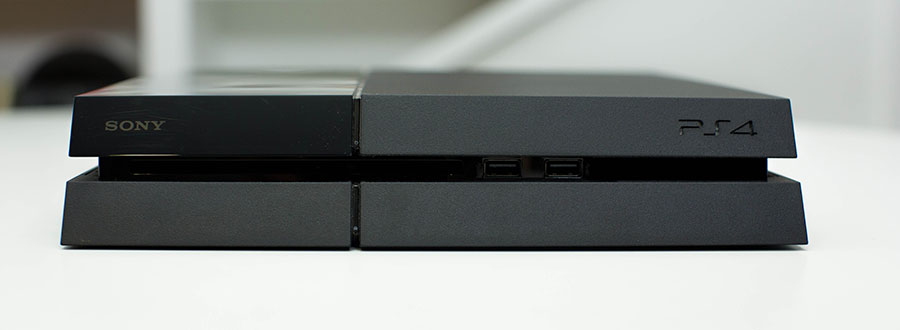
The PS4 is Sony's most attractively designed piece of hardware. It's a beautiful system, with a sharp, slightly angled profile accented by a light bar that acts as a console status indicator.
On the back, PS4 has gone digital-only with HDMI/optical ports, and no analog audio or video outputs. We appreciate the internal power supply — it sounds like a small thing, but it's one less object to sit on the shelf next to or behind the PlayStation 4.


Rear Front

In the bad column, it's a collection of moderate to minor annoyances. The PS4 doesn't support the new 802.11ac wireless standard, instead relying on an 802.11b/g/n radio at 2.4 GHz — no 5 GHz support here either, all of which is disappointing to see on a consumer device in 2013. More annoyingly to many on staff, the PS4 doesn't include an IR port for universal remotes, nor does it support Logitech's PlayStation 3 Bluetooth Harmony adapter or the PS3 Bluetooth Blu-ray remote. This omission seems to signal Sony's abandonment of the media aspirations that drove much of the PS3's basic design.
Players who want to game privately on their consoles might be temporarily annoyed at the absence of Bluetooth headphone audio support for the PS4 at launch.
This is offset somewhat: the PS4 can broadcast all game audio (and voice chat) to the audio/mic jack on the DualShock 4, which is compatible with all headphones and mobile headsets using 1/8 inch audio adapters — though enabling game audio output on the DualShock 4 disables all audio via HDMI and optical out.
Despite these problems, Sony nails the fundamentals with the PS4 hardware. The half-gloss, half-matte finish is a pleasant visual compromise. It's a grown-up machine, designed more like a stylish DVD player than a gaudy video game console. It's a small, attractive system, and one that also happens to pack more powerful hardware in its diminutive frame than any other console.
The PS4 is Sony's most attractively designed piece of hardware.
It's an impressive technical achievement. It's also compact enough to fade into your entertainment center without being distracting or ostentatious, and we appreciate that it retains the PS2's and PS3's ability to stand vertically. Those of you with frisky pets or children may want to invest in the vertical stand, sold separately, for some added stability.
Oh, and it will charge controllers over USB while in standby mode. Finally.


CONTROLLER DUALSHOCK 4

We can say this unequivocally: The DualShock 4 is the best controller Sony has ever made.
Now that the PlayStation 4 and a new console generation are upon us, a contingent of Polygon's editorial staff feels free to finally admit a deep, unbridled hatred of the DualShock 3. The sticks were too close together, too squishy; the triggers weren't triggers; those of us with bigger hands had difficulty using the controller for very long.


DUALSHOCK 3
DUALSHOCK 4
DUALSHOCK 4

Sony has solved every one of these problems with the DualShock 4. Its sticks are farther apart, with semi-concave pits in the middle designed to hold the tips of your thumbs in place. The shoulders feature actual concave triggers with pull similar to an Xbox 360 controller.
The controller is just a little heavier, just a little bigger. It's much more comfortable to hold over long periods of time. Making even die-hard DualShock 3 haters on the Polygon staff converts, the DualShock 4 is the most immediately apparent improvement offered by the PS4.
The DualShock 4 is the best controller Sony has ever made.
There are several small touches that, as with the console itself, underscore a sense of general hardware quality and polish. The DualShock 4's front-facing light glows blue for the primary connected player and changes colors based on the order in which it's synced to the console. Games can also take over the light and change its color, but the most practical use is the amber glow the DualShock 4 emits while it's charging.
While Sony has seemingly done nothing to expose or surface it, the DualShock 4 also introduces refined gyroscopic and accelerometer-based motion control. It's an incredible improvement from the Sixaxis and the DualShock 3.

RearFront


IMPERFECTIONS

The DualShock 4 isn't without some minor issues: the new options and share buttons are far too flush with the face of the controller and take too much pressure to use. It quickly proved easier to use the PlayStation button — now situated between the controller's analog sticks — to suspend a title to take quick breaks.
But our biggest complaint for a controller that some at Polygon otherwise consider the best they've ever used: the battery life.
The new touchpad works well for certain functions, like selecting weapon modes in Killzone: Shadow Fall. But it proved a poor mouse substitute in Assassin's Creed 4's map screen, with slow, latency-prone movement. We'll need more opportunities to use it in more titles before we can determine whether this is a hardware or software problem.
But our biggest complaint for a controller that some at Polygon otherwise consider the best they've ever used: over the course of 100-hundred plus hours with the DualShock 4, the battery life appears to sit somewhere in the 7- to 8-hour neighborhood, a fraction of the 30-hour battery life on the DualShock 3. As the system only includes one micro USB cable 1.5 - 2m in length, marathon sessions might happen on your floor near the PS4. As with the DualShock 3, the DualShock 4 battery isn't intended to be replaced, though enterprising users may be able to find replacements online in the coming years.

OPERATING SYSTEM USER INTERFACE & EXPERIENCE

At first glance, it may appear that the PS4's user interface shares little in common with the PlayStation 3's "XrossMediaBar" interface, a familiar sight for owners of Sony's 2006-era televisions. But the PS4's interface is again similar to Sony's current televisions and with use, a clear evolution of the XMB is apparent. It retains its predecessor's speed, while adding a flexibility that the rigid XMB hierarchy never allowed.


IMPROVEMENTS

Little things stand out. You can temporarily suspend a game at any time by hitting the PlayStation button and, say, change your display or audio settings without quitting the game in question. After seven or eight years of the Xbox 360 and PS3, navigating the PS4's menus and UI quickly and with little lag is one of the more refreshing elements of the next-gen console experience.
One major, appreciated change: the bifurcated User/PSN ID system of the PS3 is gone. You can now skip the PS3's user ID/PSN ID association process and directly download your profile onto the PS4. The PS4 also supports greatly improved user switching, and its guest feature allows you to temporarily download a PSN profile onto a friend's PS4 and delete it when logged out. Other small touches delight — like double-tapping the PlayStation button to toggle between active apps and games.


The legacy of the Playstation 3's operating system remains in the PS4's often confusing hierarchy of menus, sub-menus and hidden options. For example, the console's Notifications menu includes Notifications, Invitations, Game Alerts, Downloads and Uploads, all as distinct inboxes. The Friends menu includes separate inboxes for Friend Requests and Name Requests, both of which also appear under Notifications. Perhaps the utility of these discrete areas will become more clear with more time spent using the system.
After seven or eight years of the Xbox 360 and PS3, navigating the PS4's menus and UI quickly and with little lag is one of the more refreshing elements of the next-gen console experience.
Local media playback, a major feature of the PS4's predecessor, isn't supported. The PS4 also lacks any meaningful digital library management. Games are listed in an endless horizontal line with no organizational options whatsoever. Every single PS4 disc that you insert into the drive automatically installs and slots itself into that list, surely an impediment to finding what you're looking for quickly.
Other advertised PS4 features haven't made it in time for even the system's day one update. The console lacks a sleep feature, meaning it requires a full reboot whenever it's shut down — and active game sessions are closed. We also hope that Sony takes a second crack at the PS4's native video capture and sharing. It's a cool idea, and the implementation works, but the video we've seen is heavily compressed and muddy. It robs games on the platform of some of their wow factor
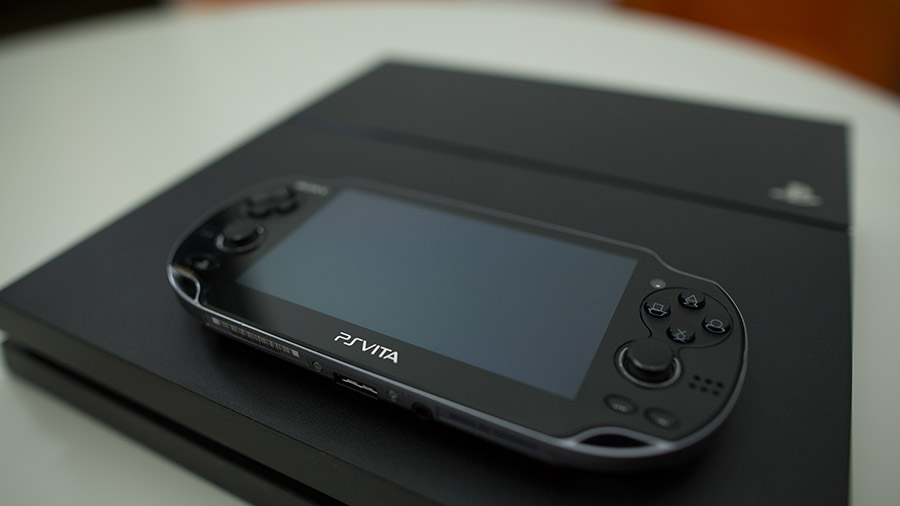
It's also worth pointing out that while the interfaces of the PlayStation 4 and PlayStation Vita are both well-suited for their respective mediums, a television and a touch-controlled portable, respectively, the differences between them provide a curious contrast for two current products bearing the PlayStation brand name.


PLAYSTATION NETWORK ONLINE PLAY

The PS4 makes some fundamental improvements to basic network functionality. You can now join friends' games from your friends list. The PS4 also introduces game-independent party chat for up to eight people, a godsend for multiplayer gamers hoping to avoid toxic public lobby audio.


IMPROVEMENTS

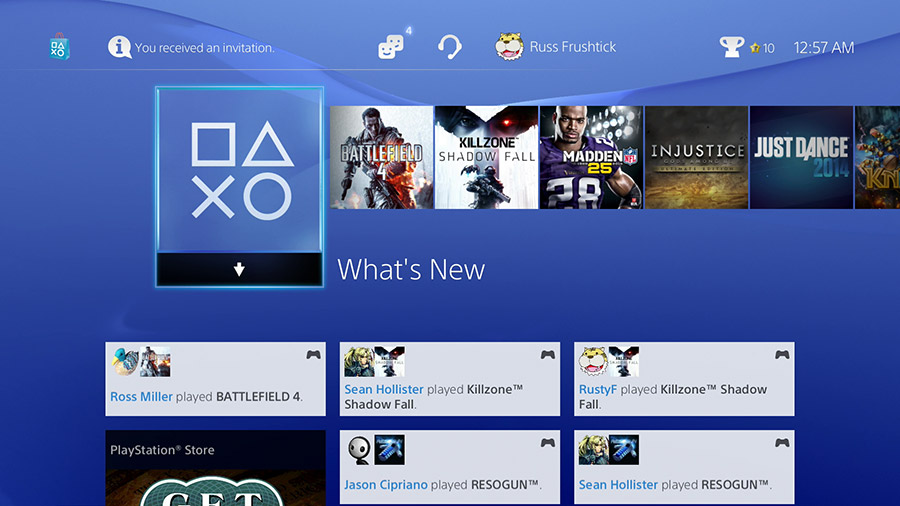
The PS4's home screen includes a feed of your friends' activity called "What's New," and this demonstrates quite a bit of potential. It shows what games your friends started to play, when they're livestreaming and … maybe too much stuff, actually. The What's New feed is a wall of informational text and from a distance, it's difficult to parse. This is indicative of a general tendency toward too many options, and an excess of surfaced information throughout the PS4's PSN functions.
There are other additions that seem beneficial, but have strange oversights that make them potentially problematic. The PSN friends limit has been increased to 2,000, which is great — but there's no way to organize them. Narrowing your friends or joining larger groups remains outside the abilities of the PlayStation 4 at present, despite system-wide Facebook integration, and sharing options that include Facebook groups. The PS4 also supports real names for friends, which could be a lifesaver — but it requires two-way authorization between both people to activate.


PSN is full of small examples of a system that badly needs reorganization and some cleanup. But make no mistake: Sony seems determined not to get left behind or leapfrogged in online this time around, and the basic functionality that eluded PSN on PS3 is now present.
The day-one inclusion of Twitch integration works well, and it's a good thing — the PS4 encrypts its entire HDMI signal in HDCP, which prevents it from working with most capture devices out of the box. For most users, the Twitch streaming is all you'll need, though we have concerns about general video quality via the system's internal hardware.
Trophies work similarly to the way they did on PS3, but now also include trophy rarity — something we hope everyone everywhere steals as quickly as possible.

PLAYSTATION STORE

Meanwhile, the PlayStation Store is very similar to the current PS3 store, which has made enormous strides over the last few years — but it shares the discoverability and organization problems of the existing store as well. It's not fair to crucify Sony over this, as every online marketplace shares these issues to some degree or another. But we're still waiting to see if anyone can address these problems.
And if multiplayer gaming isn't your thing, the PS4 doesn't lock any of its media apps behind the PS+ gate.
After seven years, Sony is joining the competition by charging for multiplayer gaming on the PlayStation 4. Players will need a subscription to Sony's PlayStation Plus service, which thankfully provides much more than unfettered access to multiplayer gaming; it also provides regular discounts on digital releases and a regular stable of free games. For the right player, it's a tremendous value. And if multiplayer gaming isn't your thing, the PS4 doesn't lock any of its media apps behind the PS+ gate. Netflix, perhaps the most prominent example, requires nothing more than its own subscription to watch on the PS4.
Perhaps as a signal to how seriously Sony is taking online multiplayer, it's included a headphone jack on the controller and a headset with every PlayStation 4. That inclusion, coupled with a new party chat system, brings PlayStation 4 to feature parity with existing competition and sets it up for continued innovation in the online gaming space.

CAMERA FEATURES & CAPABILITIES

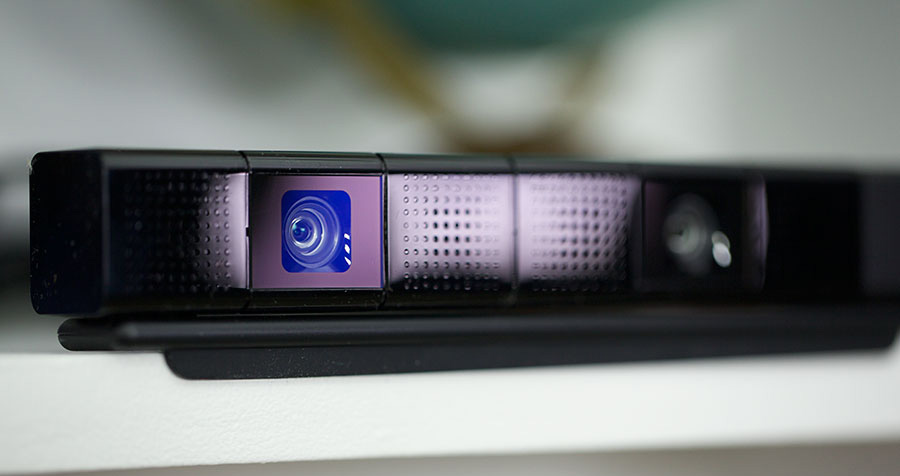
While Sony nixed plans to include the PlayStation Camera with the PS4 by default, it is still for sale, and adds some options to the system. Sony has touted the addition of voice commands to the PS4, though our limited time with this feature yielded mixed results. Commands were limited and poorly explained, and frequently went unanswered.


The easiest comparison would be with the early feature set of the Xbox 360's Kinect. The PlayStation Camera is a higher-definition device, and is likely more advanced, but there is a distinctive "first attempt" feel to the camera that seems at odds with the PlayStation 4's efforts at broader platform streamlining and refinement. But worse for Sony, its capabilities and functionality look downright primitive in comparison to the Xbox One's Kinect.
The PlayStation Camera's overall place within the PlayStation 4 ecosystem and Sony's intentions for the camera are unclear at this time.
There's no IR component, which forces users to maintain a minimum amount of light. The PlayStation Camera adds facial recognition to PS4's account system, with the procedure for adding biometric data requiring a short setup for each user. At the login screen, the camera scans the scene and, as long as it's well-lit, identifies faces it recognizes. If a user wants to log in, they simply raise the controller to match a box on the screen. The catch is, if you're using a controller here, it's easier to perform the same task with the controller.


The PlayStation Camera's overall place within the PlayStation 4 ecosystem and Sony's intentions for the system are unclear at this time. While there were elements of the new console that were clearly designed with the camera's capabilities in mind — the somewhat vestigial indicator light on the DualShock 4 comes to mind — most traces of the potential future are difficult to find in the system as it exists now.
At least it's unassuming. Whether with its stand or alone, it's a small device that doesn't occupy the same kind of real estate as the original Kinect or its hefty successor. But that's also sort of the problem. This is Sony's third attempt at a camera peripheral for a PlayStation system.
Each previous attempt was marked by an initial burst of enthusiasm and software support, something the PlayStation Camera lacks outside of the cute but minimal Playroom application included on every PS4. More damning, every previous camera was quickly abandoned, with little software support and zero official acknowledgement of its relevance.

SETUP & PERFORMANCE PATCHES & INSTALLS

We found the initial setup of the PlayStation 4 to be a relatively painless process. Upon first booting up the system, we had to download an initial patch to connect the system to PSN.
As of the time of this review, that patch is about 300 MB and took less than 15 minutes to download and install (though more crowded servers on launch day could slow that considerably).


Once the system is up to date, connecting to an existing PlayStation Network ID is a smooth process, taking just a few minutes. This brings in all the friends and trophies lists from the PS3 and Vita.
The console will also ask you if you'd like to make your real name accessible to specified friends. This Real Name functionality is a great addition and doesn't feel overly cumbersome, despite essentially requiring both parties to accept.
When PlayStation Network is humming along and working as expected, it's smooth and downloads games quickly.
If you find yourself at a friend's house, you can opt for a "guest" account. This will let you sign into your own PSN account, but not have to worry about leaving secure data behind when you log off. A handy addition, especially for dorm dwellers with cagey roommates.
Installing our first games, both from disc or through PSN, was mostly painless, though we did run into some connectivity issues that resulted in downloaded games being inaccessible until the console re-connected to the network. But when PlayStation Network is humming along and working as expected, it's smooth and downloaded games quickly. It's just not terribly easy to navigate and will definitely take some getting used to, with vague iconography to guide you.


SECOND SCREEN PS VITA & REMOTE PLAY

Remote Play of PS4 titles on the PlayStation Vita has been one of the system's most anticipated features.
Remote Play works well via wireless LAN in supported titles; several third-party releases have gone above and beyond basic support, including full Vita control in games like Battlefield 4 and Assassin's Creed 4. Sony's own first-party games like Killzone: Shadow Fall andKnack also support the feature.


However, dreams of universal access to PS4 content from anywhere via the Vita will have to wait, as even locally, Remote Play suffers from issues similar to those encountered by Wii U users. Players who move too far away from their routers may lose their connection to the PS4 or otherwise render their game unplayable.
We are somewhat confused at Sony's aggressive pairing of the Vita and PS4's fortunes with the emphasis on Remote Play, as the former device has struggled to establish a sustainable install base outside of Japan after almost two years of availability. But the potential is there for Remote Play to present a meaningful differentiation from the PS4's competition.
The Vita also presents an avenue for second-screen functionality for PlayStation 4, but Sony has smartly expanded beyond their own handheld with this week's release of the PlayStation App. The app allows message and friends list management as well as trophy options, but the primary functionality seems aimed at providing augmented app experiences for PlayStation 4 software. Sony's current showcase for the app happens through their Playroom software, where players can draw shapes and flick them out to entertain their goofy robot minions.
It remains to be seen whether developers will capitalize on the PlayStation App with any regularity, however. Even studios that are embracing second-screen functionality on the PlayStation 4 are relying on their own, dedicated applications on Android and iOS. But at the very least, Sony has multiple means of achieving feature parity with the Wii U and the Xbox One's new version of SmartGlass. The near-ubiquity of second-screen availability will hopefully encourage developers to add it to their games, which can only be a good thing.


GAMES LAUNCH LINEUP

After we've spent approximately four weeks with the PS4 at review events and with review hardware, Sony's primary goal for the system is clear.


There are pros and cons to this approach. This drive toward games first will in all probability lead to a strong ecosystem of exclusives and multiplatform titles on the PS4. The emphasis on powerful hardware dedicated to gaming software is already yielding tangible advantages over the competition, with games like Battlefield 4 running in higher resolution on the PlayStation 4 than the Xbox One.
Make no mistake: the PS4 is demonstrably more powerful than the competition.
However, at launch, the PS4 has failed to muster a software library that sells that hardware.
Downloadable shooter Resogun is a beautiful bright spot in the PlayStation 4's lineup, and even better, it's free for PlayStation Plus subscribers. But Sony's major AAA launch exclusives are impossible to recommend. Killzone: Shadow Fall is gorgeous but poorly designed and boring for the duration of its campaign. Sony Japan's Knack is a surprisingly difficult grind, which drags on for too long with too little to say or do.
Worse for Sony, the delta between most next-gen and current-gen releases this fall has proven minimal beyond superficial visual improvements. While games like Assassin's Creed 4 look better on PlayStation 4, they aren't enough to recommend stepping onward and upward to a new console.
This is an enormous challenge for the PS4. As a system focusing on games, that's where it currently lives or dies. Just as problematic, Sony's currently announced slate of platform exclusives is thin — shy of Infamous: Second Son, there's little to carry the PS4 through the spring and summer of 2014. This is a notoriously precarious period for new consoles, as demonstrated by the software struggles of both the PlayStation Vita and the Wii U in the year following their release, and we're not sure what bridges Sony intends to build between release and holiday 2014.
Sony's repeated emphasis on indie titles has borne little fruit for launch outside of the disastrousContrast, which appears for free on PlayStation Plus. We expect that 2014 will be dotted with some of the titles that Sony brought to this year's E3 and Gamescom stages — but their absence from view has us wondering what happened and, more specifically, why they couldn't make it for launch.
To be clear, we're not saying there won't be good, interesting software for the PS4. We think that's inevitable. But we don't know what that software will be, or when it will see release.